Durch die Nutzung von CI/CD bei KiCad-Projekten können Projekte automatisiert dokumentiert und die notwendigen Produktionsdaten automatisiert erstellt werden. Die Möglichkeiten sind nahezu endlos und es lassen sich beliebige und unterschiedlich Komplexe Arbeitsabläufe realisieren. Ich möchte mit diesem Artikel meinen eigenen Arbeitsablauf, den ich in den letzten Monaten stetig weiterentwickelt habe, vorstellen.
Beispiel
Bevor ich mit dem Aufbau meines Ablaufs beginne, möchte ich die praktische Nutzung an einem Beispiel vorstellen, Hierfür nehme ich meinen Zigbee Raumsensor. Dieses Projekt beinhaltet verschiedene CI/CD-Pipelines, wobei eine davon genutzt wird um die angehängten Produktionsdaten für das PCB zu erstellen.
Der Ablauf unterstützt vier verschiedene Varianten:
| Variante | Beschreibung |
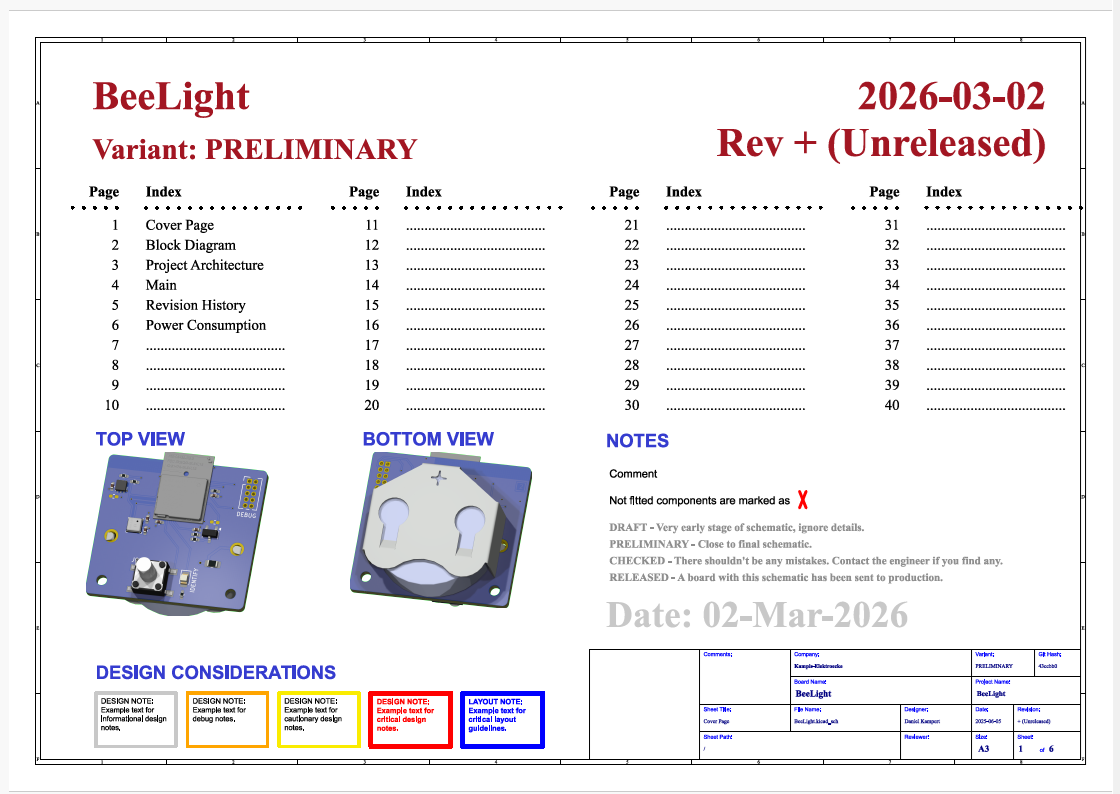
| DRAFT | Wird für die ersten Schaltplanentwürfe, ohne Layout genutzt um die entsprechenden Felder in den Dokumenten auszufüllen und die notwendige XML-Datei für das Inhaltsverzeichnis zu generieren. Üblicherweise wird dieser Build nur ein einiges mal ausgeführt. |
| PRELIMINARY | Wird für den Schaltplan und Layout ohne DRC/ERC genutzt. Kann mehrmals genutzt werden um zum fertigen Design zu iterieren. |
| CHECKED | Wird für den Schaltplan und Layout mit einem DRC/ERC genutzt. Dient als Releasevorbereitung um zu prüfen ob das Projekt vollständig ist. |
| RELEASED | Wird nicht manuell, sondern nur automatisch bei Push auf ein Tag ausgewählt und indiziert einen Release-Build. |
Die Variante wird über den CI/CD Job festgelegt und kann so z. B. bei einem Versionsrelease entsprechend geändert werden. Abhängig von der ausgeführten Variante beinhaltet der erzeugte Datensatz:
- Ein komplettes 3D-Model der Leiterkarte als Step-Datei
- Eine statische Webseite zu dem Projekt mit allen erzeugten Daten
- Bilder von der unbestückten und der bestückten Leiterkarte, jeweils Ober- und Unterseite
- Eine KiRI-Konfiguration um die Änderungen am PCB nachvollziehen zu können
- Fertigungsdaten in Form von Gerber- und Bestückdaten
- Eine Netzliste und den Schaltplan
- Dokumentation zu Testpunkten
- Eine Projekt-README
Der Schaltplan selber ist hierarchisch aufgebaut und beinhaltet Informationen wie
- Ein Titelblatt mit Inhaltsverzeichnis
- Ein Blockdiagramm
- Die Schaltung
- Eine automatisch generierte Versionshistorie
KiBot
Ausgangsbasis des Arbeitsablaufs ist KiBot, ein Programm welches genutzt werden kann um diverse Datensätze aus einem KiCad-Design zu generieren. KiBot arbeitet mit Konfigurationsdateien im YAML-Format und kann über ERC/DRC, über Produktionsdaten, wie z. B. Gerberdaten, bis hin zu einer Dokumentation mit Titelseite, Schaltplan, Kostenkalkulation, etc. alles an Daten erzeugen, was man für ein ordentliches Release benötigt. Besonders mächtig wird KiBot in Kombination mit einem CI/CD basierten Ablauf, wie er z. B. bei GitHub oder GitLab genutzt werden kann. Hierfür bietet es sich an KiBot als Docker-Container zu integrieren.
KiCad-Bibliothek
Seitdem ich KiCad nutze arbeite ich an einer einzelnen Bibliothek, die alle Symbole, Bauteile, Modelle, etc. meiner KiCad-Projekte enthält. Diese Bibliothek ist der Ausgangspunkt eines jeden Designs und immer wenn ich ein Symbol oder einen Footprint permanent ändern möchte, lege ich ihn als Kopie in dieser Bibliothek ab.
Einblick in die KiCad-Vorlage
Die KiCad-Vorlage ist allgemein gehalten und benutzt verschiedene Variablen um die hinterlegten Dateien projektspezifisch anzupassen. Der Ansatz ist so gewählt worden, damit in Zukunft weitere Dateien als generische Vorlagen hinzugefügt werden können. Die genutzten Variablen können dem Markdown-Dokument der Projektvorlage entnommen werden.
# Template Variables

The `init-project.sh` script replaces the following placeholders automatically when a new project is initialized from this template.

## File Variables (`${...}`)

Replaced via `sed` in all text files (`.md`, `.yaml`, `.adoc`, shell scripts, etc.).

| Variable | Description | Example |
| --- | --- | --- |
| `${PROJECT_NAME}` | Human-readable project name | `My Sensor Board` |
| `${BOARD_NAME}` | KiCad board name (used for file naming) | `MySensorBoard` |
| `${DESIGNER}` | Full name of the hardware designer | `Jane Doe` |
| `${EMAIL}` | Designer e-mail address | `jane@example.com` |
| `${COMPANY}` | Company / organisation name (optional) | `ACME Corp` |
| `${REVISION}` | Initial revision string | `1.0.0` |
| `${RELEASE_DATE}` | Human-readable release date | `02-Mar-2026` |
| `${RELEASE_DATE_NUM}` | ISO release date | `2026-03-02` |
| `${GIT_URL}` | Full GitHub repository URL | `https://github.com/user/repo` |
| `${GIT_USER}` | GitHub username, parsed from `${GIT_URL}` | `user` |
| `${GIT_REPO}` | GitHub repository name, parsed from `${GIT_URL}` | `repo` |
| `${MASTER_BRANCH}` | Default Git branch name | `main` |
| `${PROJECT_NAME_ANCHOR}` | Lowercase, hyphenated project name for Markdown anchors | `my-sensor-board` |
| `${BOARD_NAME_ANCHOR}` | Lowercase, hyphenated board name — also used as hardware directory name | `mysensorboard` |

## KiCad Text Variables

Written into the `.kicad_pro` JSON under `text_variables`. Available inside KiCad schematics and PCB layouts via `${VARIABLE}` in text fields and title blocks.

| Variable | Description |
| --- | --- |
| `PROJECT_NAME` | Human-readable project name |
| `BOARD_NAME` | KiCad board name |
| `DESIGNER` | Full name of the hardware designer |
| `COMPANY` | Company / organisation name |
| `RELEASE_DATE` | Human-readable release date (`DD-Mon-YYYY`) |
| `RELEASE_DATE_NUM` | ISO release date (`YYYY-MM-DD`) |
| `REVISION` | Initial revision string |

## KiBot Variables (`kibot_yaml/kibot_main.yaml`)

| Variable | Set from |
| --- | --- |
| `PROJECT_NAME` | `${PROJECT_NAME}` |
| `BOARD_NAME` | `${BOARD_NAME}` |
| `COMPANY` | `${COMPANY}` |
| `DESIGNER` | `${DESIGNER}` |
| `GIT_URL` | `${GIT_URL}` |
Aufbau der CI/CD Pipeline
Die KiCad-Vorlage beinhaltet auch die CI/CD-Pipeline für die Erstellung der Fertigungsdaten. Diese Pipeline muss bei der Erstellung eines neuen Projektes ebenfalls entsprechend angepasst werden, damit die Daten korrekt erzeugt werden.
name: PCB Data

on:
  workflow_dispatch:
  push:
    tags:
      - '[0-9]+.[0-9]+.[0-9]+' # Match semantic versioning tags
    branches:
      - main
      - master
      - dev
      - '[0-9]*.[0-9]*.[0-9]*_Dev'
      - '[0-9]*.[0-9]*_Dev'
    paths-ignore:
      - '*.md'

env:
  # Name of the KiCad PCB file
  kicad_board: ${BOARD_NAME}

  # KiBot init point
  kibot_config: kibot_yaml/kibot_main.yaml

  # Input directory with the KiCad project and the KiBot files
  kibot_input_dir: ${BOARD_NAME_ANCHOR}

  # Output directory for the run results from KiBot
  kibot_output_dir: ${BOARD_NAME_ANCHOR}

  # Output path for the run results from KiBot
  kibot_output_path: ../production

  # Used variant. We assume:
  # DRAFT: Only schematic in progress, will only generate schematic PDF, netlist and BoM
  # PRELIMINARY: Will generate both schematic and PCB documents, but no ERC/DRC
  # CHECKED: Will generate both schematic and PCB documents, with ERC/DRC
  # RELEASED: Similar to CHECKED, automatically selected when pushing a tag to main
  kibot_variant: PRELIMINARY

  # Master branch. Can be changed for testing
  master_branch: ${MASTER_BRANCH}

  # API keys used by KiCost
  MOUSER_KEY: ${{ secrets.MOUSER_KEY }}
  DIGIKEY_KEY: ${{ secrets.DIGIKEY_KEY }}
  TME_KEY: ${{ secrets.TME_KEY }}
  RS_KEY: ${{ secrets.RS_KEY }}
  FARNELL_KEY: ${{ secrets.FARNELL_KEY }}

permissions:
  contents: write
  pages: write
  id-token: write

concurrency:
  group: pages
  cancel-in-progress: false

jobs:
  release:
    needs: generate_outputs
    runs-on: ubuntu-latest
    container: ghcr.io/inti-cmnb/kicad9_auto_full:latest

    if: github.ref_type == 'tag'
    steps:
      - name: Checkout
        uses: actions/checkout@v5
        with:
          ref: ${{ github.ref }}

      - name: Set variant to RELEASED for tag
        shell: bash
        run: |
          echo "kibot_variant=RELEASED" >> ${GITHUB_ENV}

      - name: Download updated CHANGELOG
        uses: actions/download-artifact@v4
        with:
          name: CHANGELOG.md
          path: .

      - name: Download build artifacts
        uses: actions/download-artifact@v4
        with:
          name: ${{ env.kibot_variant }}.zip
          path: .

      - name: ZIP artifact
        shell: bash
        run: |
          apt-get update
          apt-get install -y zip
          zip -r ${{ env.kicad_board }}.zip ${{ env.kibot_output_dir }}-${{ env.kibot_variant }}

      - name: Release
        uses: docker://antonyurchenko/git-release:v6
        env:
          GITHUB_TOKEN: ${{ secrets.GITHUB_TOKEN }}
          CHANGELOG_FILE: ./CHANGELOG.md
          RELEASE_NAME_PREFIX: "Release"
        with:
          args: |
            ${{ env.kicad_board }}.zip

  generate_outputs:
    runs-on: ubuntu-latest
    container: ghcr.io/inti-cmnb/kicad9_auto_full:latest

    if: "!contains(github.event.head_commit.message, 'Merge pull request') || github.ref_type == 'tag'"
    steps:
      - name: Checkout Repository
        uses: actions/checkout@v5
        with:
          fetch-depth: 0

      - name: Initialize
        run: |
          mkdir -p log

      # Run these changelog update steps only on tag pushes
      - name: Pull latest changes for changelog update
        if: ${{ github.ref_type == 'tag' }}
        run: |
          git config pull.rebase true
          git config --global user.email "github-actions[bot]@users.noreply.github.com"
          git config --global user.name "GitHub Actions"
          git fetch
          git pull origin ${{ env.master_branch }}

      - name: Getting the dependencies
        shell: bash
        run: |
          git clone https://github.com/Kampi/KiCad.git kicad-library
          echo "KICAD_LIBRARY=$(pwd)/kicad-library" >> ${GITHUB_ENV}

      - name: Extract release notes
        if: ${{ github.ref_type == 'tag' }}
        uses: ffurrer2/extract-release-notes@v2
        with:
          changelog_file: ${{ env.kibot_input_dir }}/CHANGELOG.md
          prerelease: true

      - name: Update CHANGELOG
        if: ${{ github.ref_type == 'tag' }}
        uses: thomaseizinger/keep-a-changelog-new-release@v3
        with:
          changelogPath: ${{ env.kibot_input_dir }}/CHANGELOG.md
          tag: ${{ github.ref_name }}

      - name: Add Full Changelog link to CHANGELOG
        if: ${{ github.ref_type == 'tag' }}
        shell: bash
        run: |
          current_tag="${{ github.ref_name }}"
          changelog_file="${{ env.kibot_input_dir }}/CHANGELOG.md"
          repo_url="https://github.com/${{ github.repository }}"

          # Get the previous tag (all SemVer tags, excluding the current one)
          prev_tag=$(git tag --sort=-version:refname | grep -E '^[0-9]+\.[0-9]+\.[0-9]+$' | grep -v "^${current_tag}$" | head -1)

          python3 ./scripts/update_changelog_links.py \
            --file "${changelog_file}" \
            --tag "${current_tag}" \
            --prev-tag "${prev_tag}" \
            --repo-url "${repo_url}"

      - name: Commit updated CHANGELOG
        if: ${{ github.ref_type == 'tag' }}
        uses: stefanzweifel/git-auto-commit-action@v6
        with:
          branch: ${{ env.master_branch }}
          commit_message: Update CHANGELOG
          file_pattern: ${{ env.kibot_input_dir }}/CHANGELOG.md
          push_options: '--force'

      - name: Cache 3D models data
        uses: set-soft/cache@main
        with:
          path: ~/cache_3d
          key: cache_3d

      - name: Replace .wrl with .step in PCB file
        shell: bash
        run: |
          sed -i 's/\.wrl/.step/g' ${{ env.kibot_input_dir }}/${{ env.kicad_board }}.kicad_pcb

      - name: Determine VERSION argument and override variant if tag
        shell: bash
        run: |
          last_tag=$(git describe --tags --abbrev=0 || echo "")
          if [[ "${{ github.ref_type }}" == "tag" ]]; then
            version_arg="-E REVISION='${last_tag}'"
            kibot_variant="RELEASED"
            echo "kibot_variant=RELEASED" >> ${GITHUB_ENV}
          else
            version_arg="-E REVISION='${last_tag}+ (Unreleased)'"
            kibot_variant="${{ env.kibot_variant }}"
            echo "kibot_variant=${{ env.kibot_variant }}" >> ${GITHUB_ENV}
          fi

          # Determine additional_args based on the variant
          case "$kibot_variant" in
            "DRAFT")
              additional_args="--skip-pre draw_fancy_stackup,erc,drc ${version_arg} draft_group"
              ;;
            "PRELIMINARY")
              additional_args="--skip-pre erc,drc ${version_arg} all_group"
              ;;
            "CHECKED"|"RELEASED")
              additional_args="${version_arg} all_group"
              ;;
            *)
              echo "Unknown variant: $kibot_variant"
              exit 1
              ;;
          esac

          echo "version_arg=${version_arg}" >> ${GITHUB_ENV}
          echo "additional_args=${additional_args}" >> ${GITHUB_ENV}

      # Generate notes (skipped for DRAFT variant)
      - name: Generate notes
        if: ${{ env.kibot_variant != 'DRAFT' }}
        shell: bash
        run: |
          cd ${{ env.kibot_input_dir }}
          kibot -vvvv -c ${{ env.kibot_config }} -d ${{ env.kibot_output_path }}/${{ env.kibot_output_dir }}-${{ env.kibot_variant }} -b ${{ env.kicad_board }}.kicad_pcb -s all -g variant=${{ env.kibot_variant }} notes 2> ../log/kibot_notes.log

      - name: Generate README only
        if: ${{ env.kibot_variant == 'DRAFT' }}
        shell: bash
        run: |
          cd ${{ env.kibot_input_dir }}
          kibot -vvvv -c ${{ env.kibot_config }} -d ${{ env.kibot_output_path }}/${{ env.kibot_output_dir }}-${{ env.kibot_variant }} -b ${{ env.kicad_board }}.kicad_pcb -s draw_fancy_stackup,set_text_variables,erc,drc -g variant=${{ env.kibot_variant }} md_readme 2> ../log/kibot_readme.log

      - name: Generate outputs
        shell: bash
        run: |
          cd ${{ env.kibot_input_dir }}
          kibot -vvvv -c ${{ env.kibot_config }} -d ${{ env.kibot_output_path }}/${{ env.kibot_output_dir }}-${{ env.kibot_variant }} -b ${{ env.kicad_board }}.kicad_pcb -g variant=${{ env.kibot_variant }} -E PDF_REPORT_ROOT_DIR=${{ env.kibot_output_path }}/${{ env.kibot_output_dir }}-${{ env.kibot_variant }} ${{ env.additional_args }} 2> ../log/kibot_output.log

      - name: Collect PCB costs
        shell: bash
        run: |
          cd ${{ env.kibot_input_dir }}
          revision=$(python3 kibot_resources/scripts/get_changelog_version.py -f CHANGELOG.md)
          if [[ $? -ne 0 ]]; then
              echo -e "${YELLOW}Warning: Unable to determine version from CHANGELOG.md. Defaulting to empty revision.${NC}"
              revision=""
          fi
          kibot -vvvv --skip-pre erc,drc,draw_fancy_stackup -c kibot_yaml/kibot_main.yaml -d ${{ env.kibot_output_path }}/${{ env.kibot_output_dir }}-${{ env.kibot_variant }} -g variant=${{ env.kibot_variant }} -E KICOST_CONFIG=kibot_yaml/kicost_config_local.yaml xlsx_bom 2> ../log/kicost_output.log

      - name: Upload artifacts (logs)
        uses: actions/upload-artifact@v4
        if: ${{ always() }}
        with:
          name: Log-${{ env.kibot_variant }}.zip
          path: log

      - name: Clean up
        shell: bash
        run: |
          rm -rf ${KICAD_LIBRARY}
          find . -type f -iname \*.log -delete
          find . -type f -iname \*.ogv -delete
          find . -type f -iname \*.kicad_pro-bak -delete
          rm -f ${{ env.kibot_input_dir }}/kibot_*.kicad_pro
          rm -f ${{ env.kibot_input_dir }}/kibot_*.kicad_pcb

      - name: Upload artifacts (results)
        uses: actions/upload-artifact@v4
        with:
          name: ${{ env.kibot_variant }}.zip
          path: production
          if-no-files-found: ignore

      - name: Upload updated CHANGELOG
        if: ${{ github.ref_type == 'tag' }}
        uses: actions/upload-artifact@v4
        with:
          name: CHANGELOG.md
          path: ${{ env.kibot_input_dir }}/CHANGELOG.md

      - name: Pull latest changes
        shell: bash
        run: |
          git config --global user.email "github-actions[bot]@users.noreply.github.com"
          git config --global user.name "GitHub Actions"

          if [[ "${{ github.ref_type }}" == "tag" ]]; then
            echo "Triggered by a tag, committing changes in detached HEAD state"
            git add -A
            git commit -m "Update outputs (release)"

            DETACHED_COMMIT=$(git rev-parse HEAD)
            echo "Checking out the ${{ env.master_branch }} branch"
            git fetch origin ${{ env.master_branch }}
            git checkout ${{ env.master_branch }}

            echo "Merging detached HEAD commit into ${{ env.master_branch }}"
            git merge --no-ff $DETACHED_COMMIT -m "Merge outputs from tag-triggered workflow" -X theirs
            echo "Pushing to ${{ env.master_branch }} branch"
            git push origin ${{ env.master_branch }}
          else
            echo "Triggered by a branch, using the current branch"
            git pull origin ${{ github.ref_name }} --tags --force
          fi

      - name: Discard changes to .kicad_pcb files and remove temp files
        shell: bash
        run: |
          git checkout HEAD -- *.kicad_pcb

      - name: Push outputs
        uses: stefanzweifel/git-auto-commit-action@v5
        with:
          branch: ${{ github.ref_name }}
          commit_message: Push outputs from CI/CD ($(date +'%Y-%m-%d'))

  deploy:
    needs: generate_outputs
    runs-on: ubuntu-latest

    environment:
      name: github-pages
      url: ${{ steps.deployment.outputs.page_url }}

    if: github.ref_type == 'tag' || github.ref_name == 'main' || github.ref_name == 'master'
    steps:
      - name: Determine variant
        shell: bash
        run: |
          if [[ "${{ github.ref_type }}" == "tag" ]]; then
            echo "kibot_variant=RELEASED" >> "${GITHUB_ENV}"
          else
            echo "kibot_variant=${{ env.kibot_variant }}" >> "${GITHUB_ENV}"
          fi

      - name: Download build artifacts
        uses: actions/download-artifact@v4
        with:
          name: ${{ env.kibot_variant }}.zip
          path: production

      - name: Upload pages artifact
        uses: actions/upload-pages-artifact@v3
        with:
          path: production/${{ env.kibot_output_dir }}-${{ env.kibot_variant }}

      - name: Deploy to GitHub Pages
        id: deployment
uses: actions/deploy-pages@v4Die Pipeline enthält drei Jobs:
| Job | Beschreibung |
| generate_outputs | Standardjob, der manuell oder bei jedem Push auf einen Entwicklungsbranch mit dem Namen x.y(.z)_Dev ausgeführt wird. Während der Ausführung werden Fertigungsdaten entsprechend der eingestellten Variante erzeugt und als Artefakt hochgeladen. Je nach Variante wird auch das CHANGELOG und die Revision History im Projekt entsprechend aktualisiert. |
| release | Dieser Job wird während der Erstellung eines Releases ausgeführt, wenn das entsprechende Release-Tag auf den main– oder master-Branch gepusht wird. Am Ende des Jobs wird ein Release mit den entsprechenden Informationen aus dem CHANGELOG auf GitHub veröffentlicht. |
| deploy | Dieser Job wird ausgeführt, wenn auf den main– oder master-Branch oder auf ein Tag gepusht wird und dient dazu die erzeugte Dokumentation als Deployment zu veröffentlichen. Ein Beispiel kann hier eingesehen werden. |
Am umfangreichsten ist der generate_outputs Job, da dieser Job die verschiedenen Varianten behandeln und die Daten korrekt im Projekt hinterlegen muss. Hierbei werden, auf Grund von Problemen mit dem 3D-Export, vorhandene 3D-Modelle im .wrl Format durch .stp ersetzt, das CHANGELOG entsprechend bearbeitet um die [Unreleased]-Sektion in die entsprechende Release-Sektion mit Datum umzuwandeln, KiBot mit den entsprechenden Argumenten aufzurufen und die Artefakte und die Logs hochzuladen.
Projektvorlage + KiCad-Plugin
Den beschriebenen Arbeitsablauf habe ich nach und nach in eine Projektvorlage integriert und dokumentiert. Dieses Projekt gibt es auf GitHub zum Download und es ist die Basis für ein Initialisierungsskript und ein KiCad-Plugin zur Projekterstellung. Beide Tools nutzen die Dateien aus der Projektvorlage um das Projekt entsprechend der Eingaben zu initialisieren. Als Zusatz können verschiedene Vorlagen für den PCB Stackup und Lizenzen hinterlegt und ausgewählt werden, sodass die Vorlage beliebig an die eigenen Bedürfnisse angepasst werden kann.
Das Plugin nutzt, anders als die Skripte, eine grafische Oberfläche und fragt alle notwendigen Informationen über eine Eingabemaske ab.

Unabhängig vom verwendeten Tool kann das erstellte Projekt direkt bearbeitet, auf eine beliebige Git-Instanz gepusht und der Workflow für KiBot ausgeführt werden.
Disclaimer
Der hier beschriebene Ablauf mag nicht für alle User gleichermaßen gültig oder praktikabel sein, kann aber eine gute Inspiration dafür sein, was alles mit KiCad möglich ist. Nehmt diesen Post daher gerne als Ideensammlung / Vorschlag meinerseits. Ich bin auch immer offen für neue Ideen und Anmerkungen. Meine verwendete KiBot-Vorlage basiert zudem auf der Hierarchischen KiBot Vorlage von nguyen-v.

